kennedyfan
Sr. Member
- Jul 22, 2011
- 286
- 91
- Detector(s) used
- Bank Tellers
- Primary Interest:
- All Treasure Hunting
How to distinguish new posts from already-read topics w/ followups I haven't read yet
Since the the forum got its big update recently, I've found it frustrating to visit the site, and in fact I don't come by as much. Because it's just not so easy to avoid re-reading stuff I've already read before.
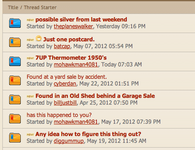
I believe that what is happening is that anything new in a topic -- a topic I haven't read at all, or even just some followups to an existing topic - make the topic show as boldface (and bump it up to the top of the list). I would like to have some way to distinguish which topic is new -- unread by me at all -- and which topic just has new replies.
And, ideally, some way on the topics that I've already read with the new replies for me to click and jump to the newest replies.
Otherwise, I find myself re-reading topics that I've already read before. And it's hard to get to the newly posted stuff, where there might be something newly-posted that I'd be interested in reading.
It seems like the old forum didn't have this problem, though I can't recall exactly what I did to recognize the posts with just new replies and how to get directly to those new replies.
Is there something I am missing? Or can this be a suggestion for some sort of improvement? Thanks.
Since the the forum got its big update recently, I've found it frustrating to visit the site, and in fact I don't come by as much. Because it's just not so easy to avoid re-reading stuff I've already read before.
I believe that what is happening is that anything new in a topic -- a topic I haven't read at all, or even just some followups to an existing topic - make the topic show as boldface (and bump it up to the top of the list). I would like to have some way to distinguish which topic is new -- unread by me at all -- and which topic just has new replies.
And, ideally, some way on the topics that I've already read with the new replies for me to click and jump to the newest replies.
Otherwise, I find myself re-reading topics that I've already read before. And it's hard to get to the newly posted stuff, where there might be something newly-posted that I'd be interested in reading.
It seems like the old forum didn't have this problem, though I can't recall exactly what I did to recognize the posts with just new replies and how to get directly to those new replies.
Is there something I am missing? Or can this be a suggestion for some sort of improvement? Thanks.