John-Edmonton
Silver Member
- #1
Thread Owner
What is de-tuning a metal detector or the Pro-Pointer?
It's when you decrease the sensitivity of a metal detector (coil) or electronic pin pointer.
Why might you want to decrease the sensitivity of a Garrett Pro-Pointer?
There are times when you have a target near a larger piece of metal, for instance, like when you hunt play equipment. The size of the metal playground equipment can cause havoc with your electronic pin pointer, especially if your pin-pointer is too sensitive and/or too deep. So, what you do, is de-tune the Pro-Pointer, so that you can get close to the metal playground equipment, which then allows you to pick up targets close to the equipment that you previously couldn't. This same scenario can repeat itself when working along a chain link fence or if you find a large coin spill.
How do you de-tune the Garrett Pro-Pointer?
Easy! Turn on the Garrett Pro-Pointer, hold the tip near (but not against)the metal, or fence, or a coin where there is a spill, keep it stationary, turn it off, then turn it on again. DONE! You have now de-tuned your Pro-Pointer. If you run a coin close to the tip of the Pro-Pointer, you will now notice that the coin must be a lot closer to the coin before it will sound off. The closer you de-tune the Pro-Pointer to a piece of metal, the less sensitivity you will get in the end. To reset the Pro-Pointer to its default setting, just turn it off, then on again away from some metal. Done! New you are again getting 2-4 inches on a coin sized metal target.
It's when you decrease the sensitivity of a metal detector (coil) or electronic pin pointer.
Why might you want to decrease the sensitivity of a Garrett Pro-Pointer?
There are times when you have a target near a larger piece of metal, for instance, like when you hunt play equipment. The size of the metal playground equipment can cause havoc with your electronic pin pointer, especially if your pin-pointer is too sensitive and/or too deep. So, what you do, is de-tune the Pro-Pointer, so that you can get close to the metal playground equipment, which then allows you to pick up targets close to the equipment that you previously couldn't. This same scenario can repeat itself when working along a chain link fence or if you find a large coin spill.
How do you de-tune the Garrett Pro-Pointer?
Easy! Turn on the Garrett Pro-Pointer, hold the tip near (but not against)the metal, or fence, or a coin where there is a spill, keep it stationary, turn it off, then turn it on again. DONE! You have now de-tuned your Pro-Pointer. If you run a coin close to the tip of the Pro-Pointer, you will now notice that the coin must be a lot closer to the coin before it will sound off. The closer you de-tune the Pro-Pointer to a piece of metal, the less sensitivity you will get in the end. To reset the Pro-Pointer to its default setting, just turn it off, then on again away from some metal. Done! New you are again getting 2-4 inches on a coin sized metal target.
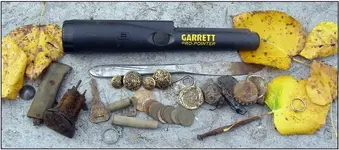


 I have turned two never before users into users of the Garrett pinpointer and if I ever left home without one I would turn around and retrieve it, it's almost as important as the main detector. You'll love it! Many times I dug my target stuck the pinpointer back in the hole and realized there's a deeper target that my machine missed but the pinpointer hit on. The other week I got a seated quarter my machine picked up found it with the pinpointer then ran my detector back over the hole nothing then stuck the pinpointer back in the hole and it was showing another target sure enough a 1897 IHP about 3 inches deeper then the quarter was. Great piece of equipment.


 this way it made much easier to match up the "HOT PINK lines!..Note: if you don't have any nail polish then ask your girlfriend or your neighbor