What's new

Garrett AT PRO problem Please Help

IDigVirginia

Jr. Member
Joined
May 5, 2016
Messages
34
Reaction score
55
Golden Thread
0
Location
Virginia
Detector(s) used
Garrett AT Pro, Fisher F4, Bounty Hunter Discovery 2200
Primary Interest:
All Treasure Hunting
First let me say I am extremely happy with my AT PRO and the Garrett company. A side note here, I lost my headphone jack cap a short while ago and called Garrett to discuss the issue with the screen I am having and mentioned wanting to purchase a headphone jack cap and they sent one for free! Got it within a week.

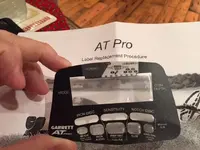
Ok now for the problem. I have had my AT PRO for about 6 months and it has done great. However, within the last month or so I have noticed this line going through my screen (see picture). I understand that it is possibly an air bubble between the decal and the actual LCD screen itself. I mentioned this while on the phone with Garrett and they suggested rubbing my finger across it and it may go away...that doesn't work. I didn't want to push the issue because of the fact they were so nice to send me the cap. I am pretty handy with this type of thing, I have replaced very many iPhone LEDs and repair computers and whatnot.

I just want to know if anyone else has experienced this problem and what the solution is. I don't want to take off the decal and try to remove the air bubble and then not be able to reattach the decal or cause further problems. Thanks for your suggestions and Happy Thanksgiving!
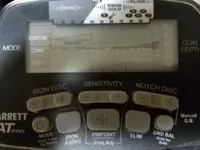

20161124_105338.webp
 
This is a common ailment of the Pro....
Happened to me too.
I got used to it, doesn't bother me at all.
 
No problem here.
 
I've had mine about a year and a half and haven't run into this problem. It's my understanding that this can be a problem on the pro. It's happened to others and Garrett will send you a new decal for free.
 
searched.gif
I searched
tn_02.gif
and found (as other members have noted) a lot of "screen problems" (i.e., Problem with the AT PRO VDI window (Dec 09, 2014), etc.). Now, even though you really don't want to - I recommend calling Garrett and see what they do because it is only going to get worse and it appears to be a well documented problem. Please let us know how it goes.
 
Hello IDigVirginia,

I had the same problem, but it looked like a crack on the screen. When I would rub the "crack" it would move slightly or disappear. I called Garrett and they sent me a new face decal. It's been three years with this problem and still have not replaced the decal. LOL. I usually do not use the screen while hunting, so it wasn't really a big deal for me.

GL & HH
 
Mine has a small mark like that running vertically just to the side of the depth meter. It wasn't a problem affecting operation so I never cared.
 
When i got my AT-Pro new 2+ years ago it had the same problem though not as bad as yours. It was annoying at first but got used to it. 2 months ago I sent it to Garrett to check the depth settings and they replaced the casing for free(as part of the tune-up) so the problem was indirectly solved. In your case, I don't think they would have a problem with replacing the decal/casing, whatever, to fix the problem. They charged me 0 for the parts replaced and labor performed. And they pay for return shipping. Hope this helps.
 
Mine had the same line, and I sent it in for a different reason while still under warranty. When I got it back, the line was gone, but within a few months the line is back.
 
i would call Garrett and explain what is going on and that you are very unhappy about it. they will fix it or maybe replace. i am neurotic about all my detectors, AT Pro included and that would bother the heck out of me.
 
by the way, where do you dig in virginia?i also dig in virginia. hope we are not jumping each others sites. :dontknow:
 
First let me say I am extremely happy with my AT PRO and the Garrett company. A side note here, I lost my headphone jack cap a short while ago and called Garrett to discuss the issue with the screen I am having and mentioned wanting to purchase a headphone jack cap and they sent one for free! Got it within a week.

Ok now for the problem. I have had my AT PRO for about 6 months and it has done great. However, within the last month or so I have noticed this line going through my screen (see picture). I understand that it is possibly an air bubble between the decal and the actual LCD screen itself. I mentioned this while on the phone with Garrett and they suggested rubbing my finger across it and it may go away...that doesn't work. I didn't want to push the issue because of the fact they were so nice to send me the cap. I am pretty handy with this type of thing, I have replaced very many iPhone LEDs and repair computers and whatnot.

I just want to know if anyone else has experienced this problem and what the solution is. I don't want to take off the decal and try to remove the air bubble and then not be able to reattach the decal or cause further problems. Thanks for your suggestions and Happy Thanksgiving!


View attachment 1384757

Called Garrett and told them the screen was separating.
They were aware of the problem and sent a replacement free. GL & HH

ATPro Screen.webp
 
Stop buying Garrett AT PRO, that would solve all yours problems.
 
Stop buying Garrett AT PRO, that would solve all yours problems.
Have not had any probs with my AT Pro. it is an awesome detector for the price point, esp in that it is waterproof. What type/model do you have? does not say on your profile.
 
I'm in Blacksburg, Go Hokies! How about yourself?

 

Users who are viewing this thread

Back
Top Bottom