What's new

Nic Burns

The Beep Goes On

Silver Member
🥇 Charter Member
Joined
Jan 11, 2006
Messages
3,716
Reaction score
1,504
Golden Thread
0
Location
Houston, TX
Detector(s) used
Deus II/HF2, Manticore, E-Trac, Excalibur II, V3i, Pro-Find 40, Vibra-Probe 585, TRX
Primary Interest:
Metal Detecting
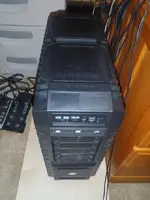
After ~25,000 hours, my system board finally gave out. I try to build a new system every five years or so if able, so this was a good excuse. I don't know how the old board lasted as long as it did; when I pulled the boards they kind of just fell out...the connections had lost all their springiness.

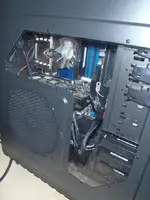
The case I got was much larger than I thought; I ordered the stuff in a bit of a hurry. But, lots of room to work in and with. I went with an Intel board (DX58SO2) and chip (i7 990x Ex Ed 3.47 6/12 core) and used my old Nvidia 470. Installed 8GB RAM and Win 7 64-bit. My kids call it Frankenstein. It still doesn't rate very high on overall benchmarks because I'm not running RAID or SLI video. This could be remedied, but I'm not gaming much anymore :wink:
 

Attachments

  • image9.webp
    image9.webp
    33.2 KB · Views: 286
  • image6.webp
    image6.webp
    31.1 KB · Views: 276
  • image3.webp
    image3.webp
    16.6 KB · Views: 271
The Beep Goes On said:
This could be remedied, but I'm not gaming much anymore :wink:
Shame to waste all that nice hardware by NOT gaming anymore . . . So, what games and I might be able to help you with that :laughing7:

What kind of rating are you getting?

BTW, what games . . . ? I keep my old Alienware case, but it is no longer a tame little machine. MSI 870 Military Grade board, AMD PhenomII 955 and ATI 5750 graphics (yeah, I prefer chocolate ice cream to vanilla too). Get avg 300 fps in rFactor with all setting maxed, but of course only 60 in Hot Pursuit 2010 (software throttled).
 
That's a sweet system Smee! I've got Black Ops and Hot pursuit loaded, but haven't played them yet (on this machine). What are you running for storage? I've been investigating a few options and would appreciate anything you had to say on the matter.
 
Storage: Seagate 500 gig HDD. But that's a personal choice . . . I still have the original Seagate 160 GB HDDs that came with my Alienware back in 2004.

My brother and my best friend swear by Western Digital but I have nothing but trouble from them . . . they, on the other hand, have nothing but trouble with Seagate.

My best suggestion is, if you've had success with a brand --- stick with it. For me, the 5 year warranty Seagate has offered on HDDs (and which is still available on some models) is a BIG consideration.

You might be interested to know that Seagate also offers "surveillance drives" designed the for nonstop spinning of a video surveillance system. Those things will eat up a regular HDD in a few months. Speed is the same, so I'm going to see how this one fares at gaming.

If you decide to race the PC version of Hot Pursuit online, friend me: PRL_Smee (PRL = Phoenix Racing League, which is a team handle) and we can run a few. We could probably get hooked up on Teamspeak through the NFBS Clan's servers. They are a great bunch of gaming guys and gals from all over the world. On their forum I'm known as Cerealkiller (Cereal, like in "Froot Loops").
 
Cool, thanks CK! Maybe I'll see you online. Control in HP is much better with this system...response is immediate and the video is untra smooth with the settings maxed out.

For drives I was thinking about getting a RAID 5 SATA controller (mboard only does 0, 1, 10). Then add 5 10K rpm small drives (250GB) so I would end up with 1TB and fault tolerance. The speed should be very good, I would assume.
 
Personally, I avoid raid arrays like the plague. I've had two experiences with them on my machines . . . and both ended badly with a serious loss of data which, for a business, isn't a good thing.

Yeah, speeds up loading, and access. Losing data for me though slowed everything to a crawl.

That being said, your mileage may vary.
 
That's true in many cases. With RAID 5 you can lose a drive, replace it and keep on running. Two drives gone and you're toast, so you still need to backup. I guess a cheaper, easier and more straight-forward approach would be to get a 250GB 10Krpm drive and load your "data-intensive" applications :wink: on it for faster access and tranfer rates. If you did go RAID, there are boards that have all the RAID logic hardwired; off-loading cycles and freeing up memory otherwise used for resident RAID code.
 
My Battle Field 2 still serves me well when I 'need a fix'. Other than that, Xcel, word, email works just fine for me.

Let me just add that a lot of failures is because of lint blocking the air flow. Processors used to be very good in terms of shutting themselves down do to overheating (back in the pentium 1 days). But these days, it'll fry a chip in no time flat... plus a lot more processing power is turned over to the GPU these days, so that's another fan that needs to be cleaned every 6 months or so.

Lint: The PC killer.
 
True enough...I always keep a few cans of compressed air around. For the keyboard, sweat and dust make mud, so I blow it out all the time. For the CPU, keeping the dust bunnies down and the fan blades clean is something worth doing fairly often. I've seen motherboards fail just because a hair was stuck to the back of it.
 
The Beep Goes On said:
True enough...I always keep a few cans of compressed air around. For the keyboard, sweat and dust make mud, so I blow it out all the time. For the CPU, keeping the dust bunnies down and the fan blades clean is something worth doing fairly often. I've seen motherboards fail just because a hair was stuck to the back of it.

Not to toot my own horn here... but... No, No, No.... Get yourself a compressor, and when your gear starts acting up, take it outside, and blow it out with 120 psi. You'll be surprised by what you get. Those little canisters of air are made for two things only... to blow out dust from your keyboard, and to walk on sunshine.... ........................(I hope you got that joke).
 
I do that too, when necessary. Usually during full teardowns. Don't spin the fans with too much pressure or they are more likely to fail.
 
Personally, I use a little vac I got from Cyberguys. Works as well as the canned air but is a one time investment. Been using it for over 6 years to blow out customers' computers and been very satisfied with the results.

It blows them out, then I swap ends with the hose and it sucks up the dust. Keeps my keyboards clean as well.
 
Go with liquid cooled system and avoid the lint issue. No air intake = no lint.

Be sure to throw in an image program for HD back up. Acronis, Ghost etc... Use them often to image your drive and should you ever have a
drive failure you can copy imag back in very short time onto replacement drive and be back in business. ( No pun intended, smee).


Ray S ECenFL
 

Users who are viewing this thread

Latest Discussions

Back
Top Bottom