
You are using an out of date browser. It may not display this or other websites correctly.
You should upgrade or use an alternative browser.
You should upgrade or use an alternative browser.
pennpilots up!
- Thread starter rugratt
- Start date

crazyjarhead
Gold Member
- Joined
- Sep 10, 2007
- Messages
- 10,318
- Reaction score
- 45
- Golden Thread
- 0
- Location
- N. San Diego County
- Detector(s) used
- Ace 250
- Primary Interest:
- Metal Detecting

rugratt said:
thanks
I still get
msLoadMap(): Unable to access file. (../htdocs/mapserver/40/42107/m26944.map)
at my other link
I Hate it !
I liked the old site better.
Very dissappointed.
I Can't find the old Photos
I liked the old site better.
Very dissappointed.
I Can't find the old Photos
rugratt said:jeff, take a deep breath its not that bad, lol. i had to play around with it to get used to it. Just zoom in, click on aerial and then choose your year. you should then see the red dots come up. right click on them to view or save.
I had a Hard time Getting the red dots up.
All of a sudden they appeard but don't know Why.
Maybe it just took time for them to download on my computer.
Seems evrytime I want to look at another pic I have to start
from Square one.
Yes i'll get used to it.
I Do like the Better Quality 1930's pics

baspinall
Bronze Member
- Joined
- Jul 23, 2006
- Messages
- 2,465
- Reaction score
- 847
- Golden Thread
- 1
- Location
- Pennsylvania
- 🥇 Banner finds
- 1
- Detector(s) used
- XP Deus
Minelab Equinox 800
GPX 4500
- Primary Interest:
- All Treasure Hunting
I'm with you Jeff..... The red dots took awhile to load? Not sure if it's the site or my end. All N All I like the ease of panning and zooming compared to the old site. The photo quality looks the same to me? Am I missing something?
Brian
Brian
baspinall said:I'm with you Jeff..... The red dots took awhile to load? Not sure if it's the site or my end. All N All I like the ease of panning and zooming compared to the old site. The photo quality looks the same to me? Am I missing something?
Brian
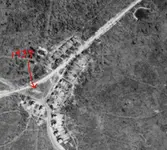
Using the 400 Zoom on the Photo, I was able to see a ball Field
where before all I saw was a White spot
Example
on the old site I couldn't see the old ball field in my town.
was just a white Blurb.
& When I increased size it Blured.
I can also see the alley Ways here.
The Outhouses with Black (probably Tar Paper) Roofs.
And the Water Lines :P
see the one going through the Triangle just to the right of the Ball Field
this was cropped from the 800MB Pic
on the old site I couldn't see the old ball field in my town.
was just a white Blurb.
& When I increased size it Blured.
I can also see the alley Ways here.
The Outhouses with Black (probably Tar Paper) Roofs.
And the Water Lines :P
see the one going through the Triangle just to the right of the Ball Field
this was cropped from the 800MB Pic

rugratt
Jr. Member
- #11
Thread Owner
Seems evrytime I want to look at another pic I have to start
from Square one.
Jeff, open the help on the right side of the date pull down. You have to follow this so you dont have to start from scratch every time. Hope this helps?
View photo point
Right-mouse click a photo point on the map to display photo information, a preview, and download links.
View a photo
Right-mouse click the desired Image Size (Small, Medium or Large) link in the photo information pop-up, and choose Open Link in New Window or Open Link in New Tab to open the photo in your browser.
Download a photo
Right-mouse click the desired Image Size (Small, Medium or Large) link and select Save Target As (in Internet Explorer) or Save Link As (in Mozilla), then follow your browser’s prompts.
from Square one.
Jeff, open the help on the right side of the date pull down. You have to follow this so you dont have to start from scratch every time. Hope this helps?
View photo point
Right-mouse click a photo point on the map to display photo information, a preview, and download links.
View a photo
Right-mouse click the desired Image Size (Small, Medium or Large) link in the photo information pop-up, and choose Open Link in New Window or Open Link in New Tab to open the photo in your browser.
Download a photo
Right-mouse click the desired Image Size (Small, Medium or Large) link and select Save Target As (in Internet Explorer) or Save Link As (in Mozilla), then follow your browser’s prompts.

halfdime
Silver Member
- Joined
- Oct 31, 2006
- Messages
- 4,521
- Reaction score
- 1,502
- Golden Thread
- 0
- Location
- Zelienople
- Detector(s) used
- White's XLT
Gotta keep this near the top! 
halfdime
Silver Member
- Joined
- Oct 31, 2006
- Messages
- 4,521
- Reaction score
- 1,502
- Golden Thread
- 0
- Location
- Zelienople
- Detector(s) used
- White's XLT
Gotta keep this near the top!
halfdime
Silver Member
- Joined
- Oct 31, 2006
- Messages
- 4,521
- Reaction score
- 1,502
- Golden Thread
- 0
- Location
- Zelienople
- Detector(s) used
- White's XLT
Need to keep this near the top!

smurf-42
Sr. Member
- Joined
- Sep 22, 2008
- Messages
- 372
- Reaction score
- 2
- Golden Thread
- 0
- Location
- Pennsylvania
- Detector(s) used
- Bounty Hunter Land Star
halfdime said:Need to keep this near the top!
I agree, but I have it saved in my favorites under main folder "metal detecting" and in the sub folder "maps".
Sue

PA John
Sr. Member
This is GREAT. I found two ballfields and what was around them back in the 40's!!
Very Cool!!
Very Cool!!

Gary in Pennsylvania
Sr. Member
- Joined
- Feb 23, 2009
- Messages
- 364
- Reaction score
- 8
- Golden Thread
- 0
- Location
- Moscow-ish, Pa
- Detector(s) used
- Minelab X-Terra 705 w/7.5&3kHz coils
Awesome!
Awesome!
Awesome!
I spent a good part of the day yesterday taking quick peeks at the site and viewing the old pics!
I was AMAZED to see that there are, in many cases, more trees in the area NOW than there was in 1939!!!!! We had a LOT of farm fields. I also identified PLENTY of young tree groves that I would now call 'woods'!
Neat!
But I'm gonna HAVE to go public with one of my 'must hunt' sites to see if any other seasoned researchers can chime in and offer some info. I thought FOR SURE that I'd see my intended target on the 1939 map......but I got NUTHIN'!
I want to know MORE!
Great post!
Thanks!
Awesome!
Awesome!
I spent a good part of the day yesterday taking quick peeks at the site and viewing the old pics!
I was AMAZED to see that there are, in many cases, more trees in the area NOW than there was in 1939!!!!! We had a LOT of farm fields. I also identified PLENTY of young tree groves that I would now call 'woods'!
Neat!
But I'm gonna HAVE to go public with one of my 'must hunt' sites to see if any other seasoned researchers can chime in and offer some info. I thought FOR SURE that I'd see my intended target on the 1939 map......but I got NUTHIN'!
I want to know MORE!
Great post!
Thanks!
Gary in Pennsylvania
Sr. Member
- Joined
- Feb 23, 2009
- Messages
- 364
- Reaction score
- 8
- Golden Thread
- 0
- Location
- Moscow-ish, Pa
- Detector(s) used
- Minelab X-Terra 705 w/7.5&3kHz coils
-
Riddle me this......
Why the heck are there two to three times MORE photos available for the 1937-1942 range than the 1967-1972 range You'd think it'd be the other way around?
I have a target......It is what appears to be an OLD foundation. I can BARELY see it on modern Google maps (though I've stood right next to it). But I cannot seem to locate it on the 1939 ariel. And there ISN'T a pic available of that spot in the 1967-1972 range! GRRRR!
What's up with THAT?!?
-
Riddle me this......
Why the heck are there two to three times MORE photos available for the 1937-1942 range than the 1967-1972 range
You'd think it'd be the other way around?I have a target......It is what appears to be an OLD foundation. I can BARELY see it on modern Google maps (though I've stood right next to it). But I cannot seem to locate it on the 1939 ariel. And there ISN'T a pic available of that spot in the 1967-1972 range! GRRRR!
What's up with THAT?!?
-

deepskyal
Bronze Member
- Joined
- Aug 17, 2007
- Messages
- 1,927
- Reaction score
- 62
- Golden Thread
- 0
- Location
- Natrona Heights, Pa.
- Detector(s) used
- White's Coinmaster 6000 Di Series 3, Minelab Eq 600
- Primary Interest:
- Metal Detecting
halfdime said:Need to keep this near the top!
Bump.
halfdime
Silver Member
- Joined
- Oct 31, 2006
- Messages
- 4,521
- Reaction score
- 1,502
- Golden Thread
- 0
- Location
- Zelienople
- Detector(s) used
- White's XLT
We need to keep this at the top!




Featured Treasure Finds
Featured Treasure Finds
Similar threads


- Replies
- 1
- Views
- 444

Users who are viewing this thread
Total: 1 (members: 0, guests: 1)














