What's new

resizing photos

digginer

Jr. Member
Joined
Dec 25, 2009
Messages
69
Reaction score
0
Golden Thread
0
when i rersize,i go top paint,pull up the photo,click on the magnifying glass in the tool bar,rersize it to my liking ,save it,send it,ity blows bacvk up.WHY,HOW,and most importantly,HOW DO I FIX IT?ANY AND ALL HELP APPRECIATED.
 
diggener,
Save your pics on a freebie hosting site, i.e. Photobucket.com, once uploaded (size doesn't matter, you just need a standard format, like .jpg, .bmp, etc.), the site will provide the
 
Go back to your Paint program.

File: Open - and open the picture you want to resize.

Click: Image (top toolbar)

Click: Resize/Skew

You will see 2 options. The top one says "resize" and has a vertical and horizontal percentage, and will be 100 for both. If you want to reduce it by half, put 50, 50 in each box, click ok. Done.

Oh, don't forget to save the changes.

If you want to keep the original big picture, give the file a different name.

Also, you can resize it to any percentage you want to.

B
 
digginer said:
when i rersize,i go top paint,pull up the photo,click on the magnifying glass in the tool bar,rersize it to my liking ,save it,send it,ity blows bacvk up.WHY,HOW,and most importantly,HOW DO I FIX IT?ANY AND ALL HELP APPRECIATED.

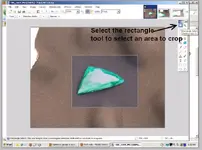
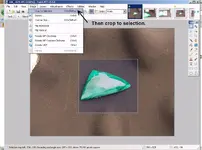
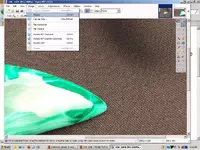
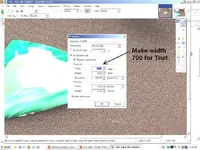
I use Paint.Net. It's free and it's easy to use to adjust size, brightness, contrast, and add arrows and text to highlight what you want people to notice. I admit I forgot once recently to resize before uploading, but if you remember to do it, this program makes it easy. You can select the number of pixels you want to go across the screen and it will maintain aspect ratio for you. Here are a couple pic's of paint.net, edited with paint.net . . . Always crop before resizing, if your pic needs cropping at all. I did it backwards, but you can still see where the tools are located and how easy they are to use.

Get it here:
http://www.getpaint.net/

EDIT: CRAP! I forgot to resize one of them again . . . >:(
 

Attachments

  • crop1.webp
    crop1.webp
    51.9 KB · Views: 144
  • crop2.webp
    crop2.webp
    122.1 KB · Views: 151
  • resize1.webp
    resize1.webp
    80.7 KB · Views: 159
  • resize2a.webp
    resize2a.webp
    78 KB · Views: 143

Users who are viewing this thread

Back
Top Bottom