Dr. Otek MT-XR, Ace Apex, Xterra Pro, Nokta Legend, Nokta Makro Impact, Manticore, XP ORX, XP Deus 2 WS6 Master, XP Deus 2, Deeptech Vista X, Nokta Makro Invenio Pro
I've been using AI to learn the best ways to use the Invenio Pro. I'll be posting some of these tests and workflows here to provide an understanding of how the detector actually works for those that may be interested. More to come...
Dr. Otek MT-XR, Ace Apex, Xterra Pro, Nokta Legend, Nokta Makro Impact, Manticore, XP ORX, XP Deus 2 WS6 Master, XP Deus 2, Deeptech Vista X, Nokta Makro Invenio Pro
August 2, 2026: Horseshoe using the INV28 and INV40 coils. GROK gave me tests to run after examining the manual. Posted below are GROK's response to adding the scan images.
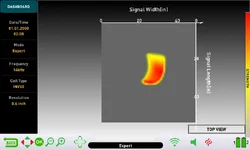
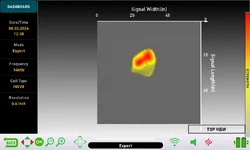
Horseshoe scan comparison – INV28 vs INV40
Nice test. Here’s a clear read of the two Result Screens:
INV28 (smaller coil)
Compact, roughly oval/blob-shaped signal.
Strong red core with yellow edges.
The distinctive open curve of the horseshoe is mostly lost. It looks more like a solid mass than a U or C shape.
INV40 (larger coil)
Clearer curved / C-shaped signal.
The open side and overall arc of the horseshoe are visible.
Still somewhat thickened and smoothed, but recognizably horseshoe-like compared with the INV28 result.
Why the difference?
The INV40’s larger detection field does a better job of “seeing” the overall outline of a relatively large object like a horseshoe in a single scan. The INV28, being smaller and more focused, tends to emphasize the strongest part of the signal and can under-represent the full shape of bigger iron objects, especially on a surface test.
This is consistent with what the manual notes: larger coils can produce better general form on bigger targets, while small shallow targets sometimes collapse into stick-like shapes with the big coil. Here the horseshoe is large enough that the INV40 wins on shape fidelity.
Quick tips to improve both results
Scan technique – Slow, heavily overlapping passes while holding the SCAN button the whole time. Keep the coil perfectly parallel and at consistent height (green zone).
Orientation – Try scanning the horseshoe both flat and on edge. Also try rotating the starting direction of your sweeps 90°.
Multiple scans – Do two or three complete scans from slightly different angles and compare the Result Screens.
Signal strength – Stronger signals (higher on the right-hand strength bar) usually give cleaner shapes. If it’s weak, raise Sensitivity temporarily for the scan.
Resolution – You’re already at 0.6 inch, which is fine. You can try lowering it further if you want more detail (at the cost of a slightly noisier image).
Practical takeaway for iron-infested relic ground
Use the INV28 when you need maximum separation between iron and nearby non-ferrous targets.
Switch to the INV40 (or at least try it) when you want a better look at the overall shape of larger iron objects or possible larger non-ferrous relics.
In the field, the workflow stays the same: search in Deep or Fast → interesting signal → switch to Expert → careful scan → judge the shape + color + size on the Result Screen before digging.
The INV40 result is already useful — you can clearly tell it’s a curved iron object rather than a solid blob or a small nail. With a bit more refinement on scan technique you should get even cleaner horseshoe outlines.
Dr. Otek MT-XR, Ace Apex, Xterra Pro, Nokta Legend, Nokta Makro Impact, Manticore, XP ORX, XP Deus 2 WS6 Master, XP Deus 2, Deeptech Vista X, Nokta Makro Invenio Pro
Posted below are GROK's response to adding the scan images.
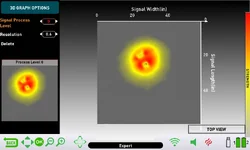
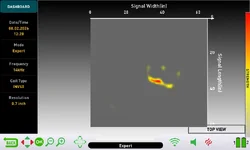
Horseshoe – Signal Process Level 0 (Raw Data)
This is a useful view.
What you’re seeing
Process Level 0 = raw data before the detector’s processing and AI smoothing.
Instead of the smoother C-shaped curve you saw at higher levels, the raw data shows two distinct strong peaks (red hotspots) inside a broader yellow area.
This often corresponds to the two sides/arms of the horseshoe giving the strongest responses, with the open middle of the U producing a weaker signal.
Why this is interesting
Higher process levels (especially 3–5) try to create a cleaner, more continuous shape. Sometimes they blend the two arms into a single curved form (which is what you saw earlier).Level 0 can reveal the underlying structure more honestly — in this case, the two-sided nature of a horseshoe.
This is exactly why the manual lets you step through the process levels:
Level 0 = raw
Level 3 = factory AI
Levels 4 & 5 = trainable levels
On some targets the raw data (or one of the higher levels) will look more like the real object than the others.
Practical tip
When you scan a target that might be a horseshoe, large buckle, or other open/curved iron:
Check Level 0 for dual peaks or an open structure.
Compare with Levels 3, 4, and 5.
If Level 4 or 5 looks more accurate than Level 3, that’s a good candidate for training the neural network after you recover the object.
The dual-peak raw view is a nice diagnostic clue for open iron shapes. Thanks for sharing it — this adds another useful reference to your growing library of scans.
Dr. Otek MT-XR, Ace Apex, Xterra Pro, Nokta Legend, Nokta Makro Impact, Manticore, XP ORX, XP Deus 2 WS6 Master, XP Deus 2, Deeptech Vista X, Nokta Makro Invenio Pro
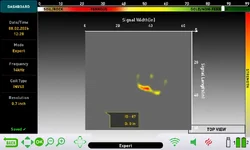
Railroad spike. I had a quarter about 5 inches to the left of the spike to check for separation. Separation was achieved using the INV28 coil. No separation using the INV40. This scan barely shows the quarter down and to the left.
Grok's responce:
Railroad spike + quarter separation test (INV40 scan)
Your observation is correct and this is a very useful result.
What the scan shows
Strong, elongated yellow-to-red signal — this is the railroad spike.
A few much weaker yellow spots around it.
The faint signal down and to the left is the quarter (as you noted). It is barely registering and is easy to miss or dismiss as noise.
Separation results
Coil
Separation at ~5 inches
Notes
INV28
Achieved
Smaller coil has a tighter detection field and better target separation
INV40
Not achieved
Larger coil’s wider field blends the strong iron signal with the nearby quarter
This is exactly the behavior we expect. The INV40 is excellent for depth and for seeing the overall shape of larger objects, but it sacrifices close-target separation. The INV28 is the better tool when iron is dense and non-ferrous targets may be sitting close to it.
Practical implications for your iron-infested relic ground
Primary search coil in heavy iron → INV28 Better chance of hearing and seeing a non-ferrous target that is near iron.
When to switch to INV40
Cleaner ground
When you want maximum depth
When you already have a clear non-ferrous signal and want a better look at its overall size/shape
Workflow suggestion for iron areas
Search with INV28 in Deep or Fast mode.
On any interesting or mixed signal, switch to Expert and do a careful scan.
If the Result Screen shows a strong iron shape with only weak secondary signals, be cautious — the weak ones may be real non-ferrous targets that the larger coil would have completely masked.
Scan tip for mixed targets When you suspect a non-ferrous target near iron, try to center the scan on the weaker signal rather than on the loud iron. Slow, deliberate overlapping passes help the detector build a cleaner secondary shape.
This test confirms what the earlier horseshoe and spoon scans suggested:
INV40 = better overall shape and depth
INV28 = better separation in trash/iron
You’re collecting exactly the right kind of data. A 5-inch separation limit with the INV40 versus successful separation with the INV28 is valuable information for deciding which coil to run in different parts of your sites.
Dr. Otek MT-XR, Ace Apex, Xterra Pro, Nokta Legend, Nokta Makro Impact, Manticore, XP ORX, XP Deus 2 WS6 Master, XP Deus 2, Deeptech Vista X, Nokta Makro Invenio Pro
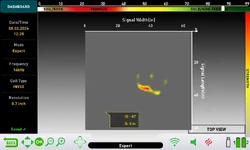
3D screen capture of the spike and quarter. You can see it picks up the quarter down and to the left.
Grok's responce:
Spike + Quarter – INV40 Top View (Result Screen)
This matches what you described earlier and gives a clear visual of the separation limitation.
What the screen shows
Main signal: Strong, curved yellow-to-red shape — the railroad spike.
Secondary signals: Several weaker yellow spots, including one clearly down and to the left of the main signal. That is the quarter.
ID: 87 / Depth: 0 in — The high ID (87) is in the upper non-ferrous range. On a mixed scan the detector is often reporting the stronger or more recently emphasized signal. Depth 0 is correct for a surface test.
The quarter is visible but significantly weaker and easy to overlook next to the dominant iron signal.
Separation summary (surface test at ~5 inches)
Coil
Quarter visible as separate target?
Practical result
INV28
Yes
Clean separation achieved
INV40
Barely
Quarter is weak / easy to miss
The INV40’s wider field lets the strong iron signal dominate, so the quarter only appears as a faint secondary response.
Key takeaway for iron-infested relic sites
When using the INV40 in areas with iron:
A strong iron shape with only faint secondary signals nearby should make you cautious.
Those faint signals can be real non-ferrous targets (as this test proves), but they are easy to dismiss.
This is why the INV28 is the better primary coil when iron density is high — it gives the non-ferrous targets a better chance of standing out cleanly.
You now have direct side-by-side proof on the same targets:
INV28 → better separation
INV40 → better overall shape on larger objects, but poorer close separation
This is exactly the kind of practical data that helps you decide which coil to run in different parts of a site. Nice test.
Dr. Otek MT-XR, Ace Apex, Xterra Pro, Nokta Legend, Nokta Makro Impact, Manticore, XP ORX, XP Deus 2 WS6 Master, XP Deus 2, Deeptech Vista X, Nokta Makro Invenio Pro
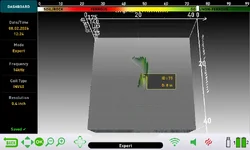
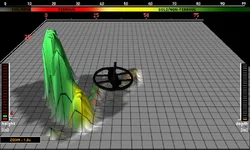
3D screen capture of the buried spoon. I buried this spoon at 9 inches a year ago.
Initial scan of the spoon.
Grok's responce:
3D Result Screen – Buried Spoon (INV40)
Good capture. Here’s the clear reading:
Key data from the screen
Target ID: 75 → Solidly in the non-ferrous / high-conductor range (green zone).
Depth: 8 in → Matches what you measured (8–9 inches).
Shape: Elongated, somewhat irregular vertical form in this 3D view. It has a thicker section and a thinner extension — consistent with a spoon (bowl + handle) seen from this angle.
Color is cleanly non-ferrous (green), which is correct for a spoon.
How this fits with the earlier top view
The previous top-view scan of the same spoon showed a thin curved/C-shaped signal. This 3D view shows more of the vertical/elongated structure. Together they give a coherent picture: a long, curved, non-ferrous object at 8 inches — exactly what a buried spoon should look like on the INVENIO.
Why this is useful
ID 75 is a strong non-ferrous number (well above the typical ferrous range).
The shape is clearly not small and round like the quarter you scanned earlier.
It is also not the thick C-shape of the horseshoe or the strong elongated iron of the railroad spike.
Depth reading is accurate.
This is a good example of the kind of signal you want to dig in relic ground: high non-ferrous ID + elongated/curved shape + meaningful depth.
Quick reference from your tests so far
Target
Coil
ID / Color
Shape character
Dig?
Quarter
INV28
Non-ferrous
Small, tight, round
Yes
Spoon (8")
INV40
75 (green)
Elongated / curved
Yes
Horseshoe
INV40
Ferrous bias
Thick C / U shape
No
Railroad spike
INV40
Strong iron
Large elongated
No
Iron ring (Fast)
INV40
Non-ferrous
Ring / larger circular
Caution
You’re building a solid visual library. The spoon at ID 75 with an elongated green shape is a clean “dig” signature.
Dr. Otek MT-XR, Ace Apex, Xterra Pro, Nokta Legend, Nokta Makro Impact, Manticore, XP ORX, XP Deus 2 WS6 Master, XP Deus 2, Deeptech Vista X, Nokta Makro Invenio Pro
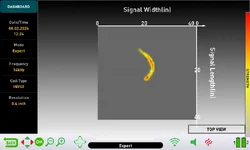
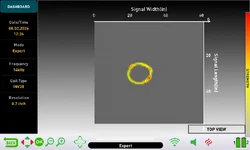
What the detector saw while swinging in motion mode.
Grok's responce:
Iron Ring – Expert Mode Scan (INV28)
Excellent result. This is one of the clearest shape captures you’ve shared.
What the Result Screen shows
Distinct closed circular / ring shape
Yellow outline with a couple of stronger red points
Clean open center — the detector is correctly outlining the ring rather than filling it in as a solid disc
Why this matters
Earlier in Fast mode with the INV40, this same iron ring produced a non-ferrous (green/yellow) response and surprised you.
In Expert mode with a proper scan on the INV28, the shape immediately reveals what the ID/color hid: it is a ring, not a coin or solid non-ferrous object.
This is the exact value of the imaging system:
ID and color can be fooled by thin or circular iron
The Result Screen shape is much harder to fool
Quick comparison with your other reference scans
Target
Coil
Mode
Appearance on Result Screen
Lesson
Quarter
INV28
Expert
Small, tight, solid round
Coin-like
Iron Ring
INV28
Expert
Clear open ring / circle
Iron ring
Spoon (8")
INV40
Expert
Elongated / curved
Utensil-like
Horseshoe
INV40
Expert
Thick C or dual-peak (Level 0)
Large open iron
Railroad spike
INV40
Expert
Strong elongated
Large solid iron
Field rule this reinforces
When you get a non-ferrous ID or tone in iron-infested ground:
Do a quick Expert scan
Look at the shape
Small solid round → higher chance of a real coin
Clear open ring/circle → very likely an iron ring, washer, or similar trash
Larger or irregular → investigate further or leave it
You now have a textbook example of an iron ring that the detector “lied” about on ID/color but told the truth about on shape. That’s exactly how you dig less trash with this machine.
Dr. Otek MT-XR, Ace Apex, Xterra Pro, Nokta Legend, Nokta Makro Impact, Manticore, XP ORX, XP Deus 2 WS6 Master, XP Deus 2, Deeptech Vista X, Nokta Makro Invenio Pro
I'll be posting more just as soon as my crazy work schedule ends. I have more to do but no time. Friday I worked 5 hours on day shift and then a 12 hour night shift into Saturday morning. Should be like this till end of September. I haven't even been out metal detecting at all in recent weeks.
Looking forward to getting back to this though. The AI is helping to understand the Invenio better.
Dr. Otek MT-XR, Ace Apex, Xterra Pro, Nokta Legend, Nokta Makro Impact, Manticore, XP ORX, XP Deus 2 WS6 Master, XP Deus 2, Deeptech Vista X, Nokta Makro Invenio Pro
AI is only as good as the info fed into it. I had it give me pointers on how to run the Manticore in heavy iron. It was way off. Then I gave it the Manty manual and it realized it's mistakes. Next time around I did find a couple of brass targets I missed. Nothing good, but they were still there.
But, the AI needs the whole story, not just bits and pieces. Once I get off this awful shift work, I hope to get some videos of the Invenio in action. I'll be using it heavy to see if it can help find the location of a French and Indian War Blockhouse.