What's new

Moth eaten photo

21stTNCav

Hero Member
Joined
Apr 11, 2006
Messages
928
Reaction score
12
Golden Thread
0
Location
Tennessee/Texas
Detector(s) used
Minelab Sov / Fisher CZ-70 Pro/Fisher CZ 20
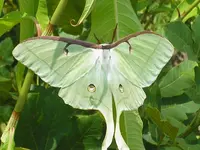
Moth eaten photo from my detecting in Tennessee this summer!! Boy, it was hot!!
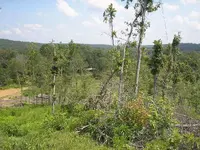
I took her while going up the logged off hill shown. I thought it might be a good area for a CW lookout. Sorry, I have not figured out how to crop yet. :help:
 

Attachments

  • 032.webp
    032.webp
    68.9 KB · Views: 215
  • 036.webp
    036.webp
    259.7 KB · Views: 200
I used windows paint to resize your pics

[mod]Thanks for the help :notworthy:. I resized them again and places them on the original post. [/mod]
 
Wow, thanks. So you can do that with windows paint???
 
Male Luna Moth, They are beautiful.
 
21stTNCav said:
Wow, thanks. So you can do that with windows paint???

Yup! Only takes a moment after you do a few. My apologies if some of these steps seem obvious, I just copy and paste these instructions when needed.


-Open the program "Paint".

-Then click "File" and then "Open". This will bring up the folders/files on your computer.

-Select the file you wish to work with.

-With the file/image open, click on "Image". This will open a drop down menu.

-From the drop down menu, click "Stretch/Skew". This will open another box.

-In this box you will see "Stretch" with options for "Horizontal" and "Vertical". The %'s for these will be at 100.

-Change the value from 100 to your new percentage (either shrinking or enlarging, though enlarging will cause some loss of quality) and click OK.

-Your picture will be re-sized. Save the newly sized photo as a new file so as to retain your original.
 

Users who are viewing this thread

Latest Discussions

Back
Top Bottom