S
Smee
Guest
- #1
Thread Owner
Just curious . . . I looked and didn't see any options where I could choose a different "style" or adjust the width of the main landing page of the forum.
When I log on, the page is so exceptionally narrow that it takes forever to reach "Treasure Marks and Signs." It isn't a matter of my computer screen being too narrow, I have it set to 1680 X 1050 on a 22" monitor.
I shrank the page to half size:
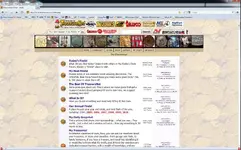
Does anyone else have this problem? It is possible that I have missed something in my profile that would set it back the way it was, but I don't think so.
When I click on any forum, it goes to full page width . . . much easier to read and navigate, but if I go back to the main page, it is back to the "narrow gate" look.
Any ideas? Can it be fixed?
When I log on, the page is so exceptionally narrow that it takes forever to reach "Treasure Marks and Signs." It isn't a matter of my computer screen being too narrow, I have it set to 1680 X 1050 on a 22" monitor.
I shrank the page to half size:
Does anyone else have this problem? It is possible that I have missed something in my profile that would set it back the way it was, but I don't think so.
When I click on any forum, it goes to full page width . . . much easier to read and navigate, but if I go back to the main page, it is back to the "narrow gate" look.
Any ideas? Can it be fixed?