What's new

Techies- Need Help With My "Favorites" Tab, Anybody?

diggummup

Platinum Member
Joined
Jul 15, 2004
Messages
17,871
Reaction score
10,149
Golden Thread
0
Location
Somewhere in the woods
Detector(s) used
Whites M6
Primary Interest:
All Treasure Hunting
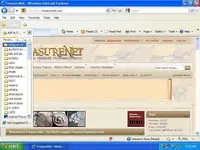
My favorites tab recently decided upon it's own to go on a crash diet and shrink to half it's original size. LOL I have googled to my wits end to try and find a remedy and/or the cause of this. It used to be twice the width that it is now, does anyone know how to fix this? I'm using IE8 with XPpro. I did nothing to any of my settings to cause this. I'm tired of this skinny box. Here is a screenshot to show what I mean-
favorites.webp
 
You've come to the right place :headbang:

Now if I could just find my favorites tab, I'll be able to help you :tongue3:
 
That's why I hate Internet Exploder! I never could get used to using a big part of the left side of my screen to show my favorites all the time.

Firefox has a "Favorites Toolbar" where you can put your most used favorites for instant access (and it stays out of the way of your browser --- just one thin row at the top of the page) and a Bookmarks menu item where you can have them drop down to choose and then disappear.

For your problem though, you should be able to put your cursor over the bars to the right of your favorites, then a two way arrow will appear and you can left click and drag it out as far as your heart desires.

Hope this helps.
 
Did you try putting your cursor on the right edge of the window, hold down the left mouse button and drag to the right?
 
Did you try putting your cursor on the right edge of the window, hold down the left mouse button and drag to the right?

Ditto what chatmangreer said.....you should be able to left click hold and slide it to the right.
 
Thanks everyone. It worked. I tried dragging it open before but I couldn't get it for some reason. It was the two way arrow and the edge of the window that explained it for me. I feel like an idiot now, since it was such a simple fix.

Chadeaux, I installed Google Chrome and am trying it out, but it's gonna take some getting used to. I've used Firefox before but I still prefer IE over it.
What do you mean by- "I never could get used to using a big part of the left side of my screen to show my favorites all the time?" :icon_scratch: It's not open all the time and constantly showing. The Chrome browser bookmarks actually takes up more space when you open it up, except it's on the right side of the screen.
 
That just goes to show how long it's been since I used Internet Exploder to regularly browse. It actually used to look like that under normal circumstances back then (Windows 3.1 -- don't remember the browser version).

In my Firefox, I have "folders" instead of actual "favorite shortcuts" in my shortcut toolbar (not an addon, but part of the Firefox Browser's functionality). Those individual sites I have organized into the folders. When I want to go here, just click the "Forums" folder and a short list drops down then I select this site and the list is instantly closed, and I'm here.

Shame dem two udder guys didn't read my post :coffee2:
 

Users who are viewing this thread

Latest Discussions

Back
Top Bottom











