What's new

A few HDR's

ronwoodcraft

Bronze Member
Joined
Jul 14, 2007
Messages
2,344
Reaction score
8,407
Golden Thread
0
Location
Idaho
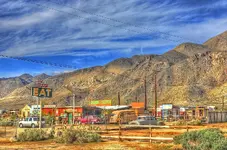
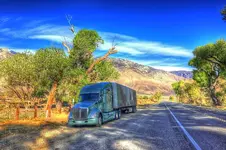
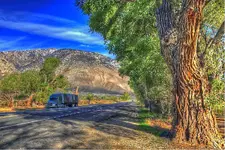
Stopped to do a load check this morning and took a couple of snapshots. I made HDR's out of them. In case no one knows, HDR means " High Dynamic Range ". Made by stacking multiple images of different exposure's of the same picture and blending into one.
Taken just south of Lone Pine, CA.


And a fine Restaurant.

See a lot of these old places in the southwest with a simple sign that says Eat or Eats.
 

Attachments
  • HDRPaint.webp
    HDRPaint.webp
    430.9 KB · Views: 113
  • 012_a_d.webp
    012_a_d.webp
    253.6 KB · Views: 103
  • 011HDRPaint.webp
    011HDRPaint.webp
    232.1 KB · Views: 96
Last edited:

Cool. You kinda got that HDR thing down. I tried that app, but mine didn't come out that good at all.
 
That is an interesting aspect of photography. Nice! :icon_thumleft:
 
Ron, did you teach yourself how to do all this fancy Photoshop stuff ? It sure is nice.
 
Damn!
An oil color painting... but wait.... it's not!

Can my camera do that?
 
That diner is a neat looking place!
 
Ron, did you teach yourself how to do all this fancy Photoshop stuff ? It sure is nice.
Thanks Grant, I'm sure there is a lot I don't know about this, but yes, everything I have learned has been self taught. I don't know if I can really say self taught because, I have learned from others on line, with a lot of trial and error.
 
Damn!
An oil color painting... but wait.... it's not!

Can my camera do that?
Thanks OV, Yes I'm sure your camera is capable of doing these kind of pics. Not sure what kind of editors you have. I use Digital Photo Professional, Photoshop elements, and Photomatix. I think DPP is a free download from Canons web site, I had to purchase Photoshop elements on a disc, and photomatix is available on line only. It's a free download you can experiment with, but it will have their big watermark across your images. If you decide you like it, you have to pay about 99.00 and the watermark will never show again.
I use the raw format in my camera, and If I want to try an HDR, I just convert make as many copies of one image to tiff or jpeg as I want, ( minimum of two ) then downsize in photoshop, then combine them into HDR in Photomatix. Finally, go back and do some final touch ups in photoshop and DPP. Sounds complicated but after you figure out a work flow it's not hard just, time consuming.

You can also use a single jpeg and just use the slider in photoshop to make darker and brighter images, and make copies with different names of each one and combine them in photomatix.
If your camera has a setting for bracketing multiple shots, you can use that one. The camera has to be on a tripod and using the cameras timer for shutter release, You can shoot multiple bracketed images of the images of the same scene and combine those in photomatix.


https://www.hdrsoft.com/download.html
 
Last edited:

Nice work Ron...sure can see the expanded dynamic range in 'em!

I've always opted for a simple blend of 5 frames, typically shot
at 0, 2 stops down, 4 stops down, 2 stops above 0 and 4 stops above
0. Downloaded a free program off the web that does the stacking
in RAW (had great references from friends), and then I'd process
it manually in Lightroom.

Since I've upgraded computers I haven't installed an processing
programs. Lightroom is now part of some "pay by the month"
gimmick, so I think I'll get the last full version on CD (can still
buy new) and just work with what it offers. I could do anything
I needed in V. 4, and I can get a V. 6 and own it.

BTW, give Little Lake a wave when you go by (South of Lone Pine
on 395). Not much left there now but a sign, but I've spent many
a night hunting bobcat in those hills just to the North. Great memories
of that place.

That's a gorgeous run this time of year..at least til you get to 4-corners.
 
Nice work Ron...sure can see the expanded dynamic range in 'em!

I've always opted for a simple blend of 5 frames, typically shot
at 0, 2 stops down, 4 stops down, 2 stops above 0 and 4 stops above
0. Downloaded a free program off the web that does the stacking
in RAW (had great references from friends), and then I'd process
it manually in Lightroom.

Since I've upgraded computers I haven't installed an processing
programs. Lightroom is now part of some "pay by the month"
gimmick, so I think I'll get the last full version on CD (can still
buy new) and just work with what it offers. I could do anything
I needed in V. 4, and I can get a V. 6 and own it.

BTW, give Little Lake a wave when you go by (South of Lone Pine
on 395). Not much left there now but a sign, but I've spent many
a night hunting bobcat in those hills just to the North. Great memories
of that place.

That's a gorgeous run this time of year..at least til you get to 4-corners.
Thanks Dizz! I have never upgraded to light room for that reason. ( pay by month ), plus I don't know if my little lap top could handle much more info. I f this one go's out, I plan to get a larger more powerful lap top, and might try the disc.

I just went through there again last Thursday, and hoped to take some more pictures in the evening light. Got shut down at Inyokern due to US 395 being closed to trucks because of high wind. Had to get up in the middle of the night and go through in the dark to make it to Reno in time for delivery.
 
Nice work Ron...sure can see the expanded dynamic range in 'em!

I've always opted for a simple blend of 5 frames, typically shot
at 0, 2 stops down, 4 stops down, 2 stops above 0 and 4 stops above
0. Downloaded a free program off the web that does the stacking
in RAW (had great references from friends), and then I'd process
it manually in Lightroom.

Since I've upgraded computers I haven't installed an processing
programs. Lightroom is now part of some "pay by the month"
gimmick, so I think I'll get the last full version on CD (can still
buy new) and just work with what it offers. I could do anything
I needed in V. 4, and I can get a V. 6 and own it.

BTW, give Little Lake a wave when you go by (South of Lone Pine
on 395). Not much left there now but a sign, but I've spent many
a night hunting bobcat in those hills just to the North. Great memories
of that place.

That's a gorgeous run this time of year..at least til you get to 4-corners.

Corel's PaintShop Pro (used to be Jasc's Paintshop) does an excellent job with HDR's and no monthly fee. Get the ultimate version for about a cnote ($100.00) and get Aftershot (Raw processing much like lightroom) free.

Well worth the price.

For my HDR I like 5 frames but sometimes settle for 3 ... depending on what I'm going for.

There are also ways of getting the same effect (or very close to it) with a single image using layers. However, much like regular HDR, it's real easy for the color vibrancy to get away from you.
 

Users who are viewing this thread

Latest Discussions

Back
Top Bottom