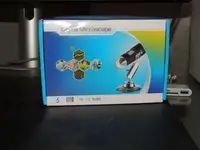
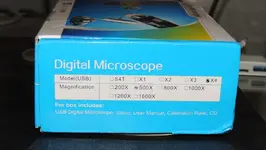
What's new

Electronic coin/jewelry microscope

The Beep Goes On

Silver Member
🥇 Charter Member
Joined
Jan 11, 2006
Messages
3,716
Reaction score
1,504
Golden Thread
0
Location
Houston, TX
Detector(s) used
Deus II/HF2, Manticore, E-Trac, Excalibur II, V3i, Pro-Find 40, Vibra-Probe 585, TRX
Primary Interest:
Metal Detecting
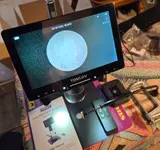
Does anyone find this useful? Has 4.5 stars ... price is less than one would think. Thinking about getting one.

1763597562651.webp
 
That would be good when you need to dig a splinter out of your hand.
Lolo, true. Probably many things it could be used for. Main reason for me is trying to get good photos with my phone.
 
Lolo, true. Probably many things it could be used for. Main reason for me is trying to get good photos with my phone.
I bought this recently, works great for photos also.
Screenshot_20251119_211536_Samsung Internet.webp

There's a magnifier plus app that really works well.
Screenshot_20251119_211536_Samsung Internet.webp

It takes a photo and it's easy to save.
Just a quick photo using it.

Resized_temp_share_918382492769814.webp
 
Cool, I have done something similar in the past, but don't have my large magnifier anymore. Definitely effective.
 
Look at digging So Cal video's on You Tube they picked up a real nice microscope. I think it is by the same company but it has more features. I have one close to what you are looking at and it is lacking in quality . I may upgrade to one with more features.
 
Does anyone find this useful? Has 4.5 stars ... price is less than one would think. Thinking about getting one.

View attachment 2234153
Personally after decades of hunting native gold, I have found it absolutely fascinating looking at gold, in particular crystalline gold types under magnification. They are amazing some structures of them. I have a very cheap one with an led light and it is truly amazing seeing them.
That would if its decent be something very interesting.
Mine is crazy cheap but it actually works ok for me to see things, its crazy small too and I can carry it in my pocket. But even as limited as it is its magnification does me.
I would imagine anything better would be fantastic to view some of the things I have found over the years.
Here is my cheapo.
A very good detecting friend gave me this yrs ago as he knew how much I loved hunting crystalline gold on the famous Mt Alexander gold fields when I first started detecting for gold. It still works.
IMG_20251120_175248145~2.webp

IMG_20251120_175324567~2.webp

IMG_20251120_175348428~2.webp

IMG_20251120_175417977~2.webp

IMG_20251120_175503070~2.webp

Has a blue light LED and white.
 
I bought a computer microscope to look at coins. It’s too powerful and field of view is tiny. The stand wasn’t tall enough to raise it high enough for coins.🤷🏼 The image it takes is very sharp but adjustable power settings would be nice.
 
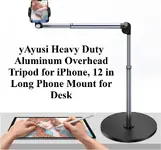
...I agree with ToddsPoint ... too powerful ...those things are good for circuit board repair, not so much for coin (object - sized) photos ... have you considered a simple table stand for your phone? ...61qBl5pKBlL._AC_SL1500_.webp

PHOTO TIPS:
(1.) Place your subject on a plain surface, such as a flat sheet of copy paper. Avoid holding it in your hands, & avoid any background with detail in your picture. Background detail may cause the auto-focus to highlight the background, leaving your subject blurry. Too many photos here with great shots of fingerprints, but the subject is out of focus ... I've seen clearer pics of Bigfoot flying a UFO, chasing the Loch Ness monster ...

(2.) Avoid direct light if possible, choosing a generally well-lit environment. After placing the subject on a plain background, try to get directly overhead as possible, without casting any shadows on the subject ... this may require moving your stand, your subject, or both ... be patient ...

(3.) Check your photo before posting it. Make certain the the object is in focus, well lit enough for all to see ...
 
I saw a pic with the scope on top of some books that allowed one to get the distance for a whole coin/item pic - not sure how this works in practice though. It also looks like you can remove the scope from the stand and do what you want - again, no direct experience.

Thanks for the ideas, tips and feedback!
 
This thread made me dig out a digital microscope I got on Amazon a good while back. I took a few quick shots. 3 resolution settings, led lighting, USB to the computer and maybe the phone ( have not tried that). Cheap.
20251120-212951-284.webp20251120-213057-364.webpOn the included stand, but not as close as possible.
20251120-214709-020.webpAs close as possible.
20251120-215530-179.webp20251120-215818-114.webpBetter than stacking books, turned it horizontal, took these at about 9 in distance, in a dimly lit room. Light from my cellphone on the 2nd one.
 
I have had a Tomlov that looks just like that for a couple of years. It takes pictures as well as displaying the image on a screen. It works great on rings, pennys, nickels, dimes and quarters. Anything larger than a quarter, it will not take a photo of the entire item due to the focal range. I believe I have have seen extended shafts available, but have not tried one.
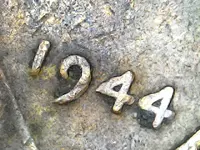
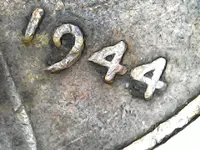
1968 D Error Penny 1.webp

This is a picture taken by mine after having the .jpg size reduced with editing software.
 
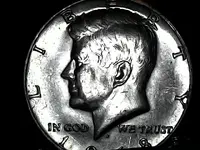
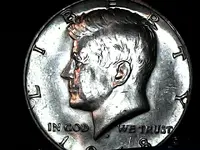
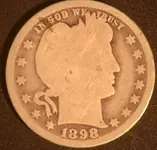
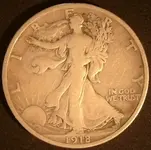
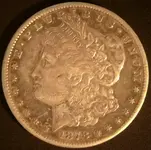
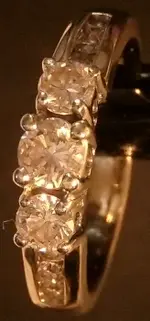
So, I got the scope in the OP, but it sucked ... grainy and contrast issues - returned it same day. I got the Tomlov TriL107 with 3 lenses instead. About 3x the price, but it is 2K rez and can fit all denominations. The remote is nice so you don't jiggle the apparatus when capturing images; can also zoom and do playback functions - photos and video. Still getting used to it. The focus is ok, but not great - I found that using the stand height knobs is a good alternative if necessary. I got an alligator clip setup for jewelry. It also has a slide viewer that comes with it. Edit: And, a 64 GB memory card - plug the scope into a computer for access.

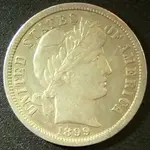
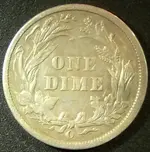
I found the 1899 O and the quarter, the others were passed down from the family.

Lighting is key, will be experimenting - you can see the difference in the images which were taken under different lighting.
 

Attachments

  • dime_1.webp
    dime_1.webp
    29.3 KB · Views: 46
  • dime_2.webp
    dime_2.webp
    32.5 KB · Views: 36
  • quarter.webp
    quarter.webp
    17.2 KB · Views: 38
  • half_dollar.webp
    half_dollar.webp
    23.9 KB · Views: 39
  • dollar.webp
    dollar.webp
    25.6 KB · Views: 42
  • ring.webp
    ring.webp
    12.2 KB · Views: 43
  • mark.webp
    mark.webp
    3.7 KB · Views: 53
  • scope.webp
    scope.webp
    154.6 KB · Views: 51
Last edited:
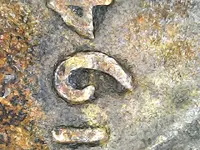
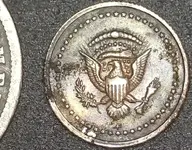
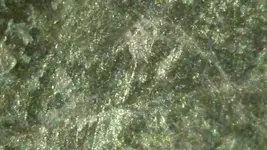
Tried some different magnifications this morning. The max zoom image is the surface of a merc, the coin is from a "presidential coin collection" or some such that my step-father had - then the ranch burnt down and I detected it years later... 4mm in size, placed next to a barber dime for scale.

Overall, I think it has value, but a good camera with high pixel count can do better in many circumstances in the right hands. It's great for real-time analysis (scope screen is better than the images), maker's marks and it makes picture taking easier, at least for me, for individual target images.

I'm running a 4K monitor so the images are a bit washed out full screen so I scale them resulting in a sharper image. 4K scopes are between ~$240-$300, then they jump into the thousands, at least on Amazon. I can live with this one, but I'd recommend the 4K for serious work.
 

Attachments

  • 4mm_coin.webp
    4mm_coin.webp
    101.7 KB · Views: 41
  • max_zoom_2500x.webp
    max_zoom_2500x.webp
    23.5 KB · Views: 44
Does anyone find this useful? Has 4.5 stars ... price is less than one would think. Thinking about getting one.

View attachment 2234153

Does anyone find this useful? Has 4.5 stars ... price is less than one would think. Thinking about getting one.

View attachment 2234153
I bought one of these. It works great to look at small objects. Coins and yes, splinters. :laughing7: I use it when I need to get close-up pictures too. Well worth the price.
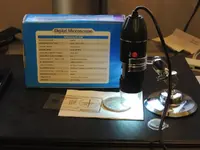
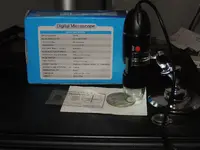
 
Finally took some photos of my digital microscope set up.
DSCN5644.webp
Live shot. Screen image with no editing. Midlevel resolution. Higher res seems to distort image.
DSCN5646.webpDSCN5647.webpFocus is manual, led lights adjust with thumbwheel.
DSCN5648.webpDSCN5649.webpSince I bought mine at Amazon this type have become more advanced I think. Now they can connect to your phone as well as the computer. I believe there are some with even more magnification. Like I said, I just turn it sideways, set the coin on the lip of the computer screen and adjust the distance for a full coin shot.
 
Finally took some photos of my digital microscope set up.
View attachment 2235303Live shot. Screen image with no editing. Midlevel resolution. Higher res seems to distort image.
View attachment 2235304View attachment 2235305Focus is manual, led lights adjust with thumbwheel.
View attachment 2235306View attachment 2235307Since I bought mine at Amazon this type have become more advanced I think. Now they can connect to your phone as well as the computer. I believe there are some with even more magnification. Like I said, I just turn it sideways, set the coin on the lip of the computer screen and adjust the distance for a full coin shot.
I notice the "snap" button on the side... is this the "take a picture" button ?
And can you take picture using computer mouse ?
 

Users who are viewing this thread

Back
Top Bottom