What's new

New place to hunt

crazyjarhead

Gold Member
Joined
Sep 10, 2007
Messages
10,318
Reaction score
45
Golden Thread
0
Location
N. San Diego County
Detector(s) used
Ace 250
Primary Interest:
Metal Detecting
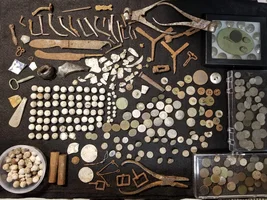
I know that this is not the place to post this but I haven't had much luck elsewhere. I downloaded the picture on photobucket. When I right click on the img line and then go to paste it on the bottom of my new post I keep getting an error message stating that I can only use jpg, gif and kml. That's what I'm trying to post is an jpg. Another guy tried to explain to my when I posted in the test section. I did what he said and still no luck. I have spent hours trying to figure this out. If you go to the test section and look at my post maybe someone would please try to help this stupid old man . I have lots of goodies that I recently found that I know you are going to like. Like silver, wheaties, old license plate, buttons ;D
 
Upvote 0
Most trouble is the size of the kb. on the picture..It has to be less than 356 k-bites KB not MB .You have to change the setting on your camera ,from normal mode to a smaller mode like computer screen mode to make the kb smaller on the pic.I had the same prob.And then just save the picture to my pictures on your computer , look at the bottom of the picture and make sure it says 356 or smaller kb. if you go play with colors and edit it /it adds more kb to them sometimes..Just make sure the size is right /numbers at the bottom of your picture.Keep playing with it,i want to see some more relics ;D P.S. I have never tried to cut and paste them... I always click browse ,next to the paste line and it finds the pictures for you .... Then right click on the one you want , hit select,then save at the bottom of tnet screen and your all done.........
 
Figured it out. Problem was that I wasn't posting it in the message area. I was trying to post it in the images area. Thanks
 

Users who are viewing this thread

Back
Top Bottom