What's new

How do I reduce the size of my pics so I can post them?????

Gilligan

Bronze Member
Joined
Sep 23, 2007
Messages
1,105
Reaction score
289
Golden Thread
1
Location
Seymour Johnson AFB, NC
🥇 Banner finds
1
Detector(s) used
Fisher F75 LTD, Deteknix Scuba Tector
Primary Interest:
All Treasure Hunting
Is there an easy way to reduce the size of my photos so I can post them on here? I tried before, but I went through a long process and it still did not work, and I just gave up. There must be an easy way that I just am not aware of. Thanks, Bryan
 
Upvote 0
I open my pics with a program (which I'm not sure where it came from, probably extra software with one of the cameras) called Microsoft Picture It, 9. It has a "save copy for" feature which allows me to save a copy for Web or Email in two easy steps.
 
Email the photo to yourself and then you'll be given an option to keep the original size or make it smaller, go with the latter. Open your email and the photo will be smaller.
CC
 
If you have Paint on your computer...You can save the picture you want posted to your Desktop.
Open paint.....click Open and it will give you a browser to select where your pics are stored....so then select the pic
Click on the tool bar for paint under Image
Select Stretch and scew
Most pics will resize at 25 ...25
rename and save the new pic after its resized Then Post
 
I have Microsoft Picture It and just like Madmardigan said I use the save option for web.

There is another program out there that is free and is very easy to use. Try Adobe Photoshop Album Starter Edition, it offers photo editing and an option to reduce the size of the picture to place on the web. You will need to play with the software to learn how to use it, but it is very easy.

Here is a link to download the software.

http://www.adobe.com/products/photoshopalbum/starter.html

I use both of these programs and can tell you both are easy to use.
 
I use paint in windows, open picture in paint, go to image re size/skew reduce horizontal/vertical from 100% down to 25% each, and save.
 
This is a free program and is one of the best I have seen for cropping, resizing, and optimizing, pics
http://irfanview.downloadcenterz.com/

Simply open the file...

Cropping
You can crop the pic by placing your cursor where you want to start and then drag it to where you want to end. If it's not exactly right you can place your cursor on the lines and move them to where you want.
Then goto "Edit", "Crop Selection"...

Resizing
Goto "Image" scroll down to "Resize"... The forums normal width for a pic is right at (800pix) in width, I usually reduce mine to (780pix) in width, or smaller...

Saving
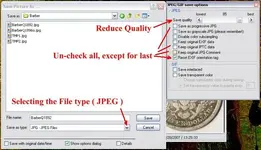
When you want save, simply goto "File", "Save as", then save as a (JPEG) file as shown below...
Irfanview.webp
The width of this pic is 780pix
Hope this helps,,,
Good luck, & Happy hunting~
 
Boy, thanks for all of the great tips. I will find out which one is best for me and start getting some pics going, thanks a million to all, Bryan
 
Man all that sounds complicated I hit editn and then save as, 50%-75% usally works here
 

Users who are viewing this thread

Back
Top Bottom