What's new

Equinox 900 - ideal beach settings

OBXmetalDet

Sr. Member
Joined
Aug 25, 2019
Messages
381
Reaction score
281
Golden Thread
0
Location
Virginia
Detector(s) used
Minelab Equinox 900
Primary Interest:
All Treasure Hunting
I got my Equinox 900. From your experience, what are the best beach settings to use when detecting:
  • Dry sand
  • Wet sand
  • Underwater (salt wawater)
In terms of settings. I'm looking for:
  • Sensitivity
  • Threshold
  • Target Tone
  • Recovery speed
  • Detect mode
I would like to ignore iron.
 
Upvote 0
To learn the detector, you need to dig everything that isn't a null/grunt, dont worry about the tones or TIDs at first, and just dig it all. If you want to find gold and learn the detector you need to dig it all at first.

Gold comes in many different tones depending on what base metal gold is mixed with to get the the different gold, 10, 12, 14, 18, 22K
 
I've attached a screenshot of the Target Tones available on the NOX 700 & 900, which you can find on page 34 of the user manual. I have the same choices on my X-Terra Elite. You can choose 1 tone, 2 tones, 5 tones, All Tones, or Depth. Some guys just want to hear 1 beep. If you select 2 tones, you'll get 2 different pitches for 2 conductivity ranges. 5 tones give you more flexibility to select different tones for different ranges of targets. All Tones gives you tones for all Target ID's. Depth gives louder tones for larger or shallow targets, softer volume tones for small or deeper targets.

I use All Tones on my X-Terra Elite as I also have a Sovereign Elite, and in discrim mode, the detector has auto iron reject and all tones. The pitch of the tone is based on the conductivity of the target, so a silver quarter will have a high-pitched tone. A nickel, some pull tabs, and some gold rings will have a mid-level tone. Lower conductivity targets like some gold will give off a low tone. Iron automatically nulls the threshold. The pitch of the tone gives an initial indication of what the target might be and/or at least the conductivity range the target is in. Try them all, then pick the one that works best for your ears.

Gotta have underwater, waterproof headphones when going completely underwater. I'll second cudamark's suggestion about getting a set of Tony Eisenhower waterproof headphones. Tony built me a set of his divers' waterproof headphones with his enhanced impedance matching circuitry for my Dual Field PI. They have small drain holes for the water to drain from the cups and are the most comfortable phones I've ever worn. Tony doesn't have a website, only works through email, so you can reach him at: tony@idigbeaches.com

Thank you for posting this. I think this helps.

I'll try Depth (dP) for the target tone tomorrow and go from there.

1. If you have a target that gives the wrong target ID for whatever reason, what tone would you get? Would you get the tone associated with the target (an accurate tone) or would the tone returned be the tone associated with the target ID (which would actually be the wrong tone)?

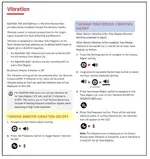
2. I was looking at page 21 about enabling Vibration. The blue section shows how to enable vibration by each tone region. I guess this implies that the yellow section shows how to enable Vibration outside of all tone regions, but how is that possible? At any given time, wouldn't you have to be in one of the tone regions?

3. Suppose you have a target that has 3 different metals in it and there are no other targets nearby. When you swing the detector over that target, what target ID would be returned? Would it be the target ID associated with metal 1, metal 2, metal 3 or even some other target ID?
 

Attachments

  • Vibration.webp
    Vibration.webp
    58.9 KB · Views: 65
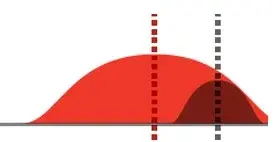
The magnetic field returned by metal A (red) completely masks the magnetic field returned by metal B. What target ID would be returned, the target ID from metal A, metal B or some other target ID? See attached pic.

The magnetic field returned by metal A (red) partially masks the magnetic field returned by metal B. What target ID would be returned, the target ID from metal A, metal B or some other target ID? See attached pic.
 

Attachments

  • Metal A completely masks metal B.webp
    Metal A completely masks metal B.webp
    2.9 KB · Views: 60
  • Metal A partially masks metal B.webp
    Metal A partially masks metal B.webp
    2 KB · Views: 55
1. You can't by tone, just I.D. #. That's why I like 50 tone.
2. Yes, headphones are a must in my book.
3. No, the external speaker is worthless underwater. Get some waterproof ones from Tony Eisenhower. You can also use the vibrating handle, but, there again, no tone or target I.D......just buzz and scoop.
On point #1, I'm not sure what you mean.

If I got those waterproof ones, I thought you or somebody else might have said that this involves making some changes to the detector which would void my warranty and that therefore I should wait until my warranty period is over. Is this true?
 
Matter of choice, of course but I use beach 2 since it shows a little more sensitivity to fine/smaller gold targets.
When you use beach 2, is that on dry sand, wet sand or when the coil is in salt water?
 
I've attached a screenshot of the Target Tones available on the NOX 700 & 900, which you can find on page 34 of the user manual. I have the same choices on my X-Terra Elite. You can choose 1 tone, 2 tones, 5 tones, All Tones, or Depth. Some guys just want to hear 1 beep. If you select 2 tones, you'll get 2 different pitches for 2 conductivity ranges. 5 tones give you more flexibility to select different tones for different ranges of targets. All Tones gives you tones for all Target ID's. Depth gives louder tones for larger or shallow targets, softer volume tones for small or deeper targets.

I use All Tones on my X-Terra Elite as I also have a Sovereign Elite, and in discrim mode, the detector has auto iron reject and all tones. The pitch of the tone is based on the conductivity of the target, so a silver quarter will have a high-pitched tone. A nickel, some pull tabs, and some gold rings will have a mid-level tone. Lower conductivity targets like some gold will give off a low tone. Iron automatically nulls the threshold. The pitch of the tone gives an initial indication of what the target might be and/or at least the conductivity range the target is in. Try them all, then pick the one that works best for your ears.
All tones sound the same to me. I can't tell the slightest difference.
 
Personally, I trust audio more than target ID

I thought the tone would always reflect the target ID? Why/how could the tone not be associated with the target ID?
 
1. If you have a target that gives the wrong target ID for whatever reason, what tone would you get? Would you get the tone associated with the target (an accurate tone) or would the tone returned be the tone associated with the target ID (which would actually be the wrong tone)?
No way to predict what tone you'll get, depends on the target. The tones and target ID's are usually based off of target conductivity. On my Sovereign, tones are based on conductivity of the target, i.e., silver gives a high-pitched tone, nickels give a mid-tone, some gold gives a low tone. I assume NOX's operate the same, as that would allow the Engineers to tie Target ID to target conductivity. When the detector determines the probable conductivity of the target, it sends that to the screen to report as a specific number(s). Most times, the number jumps up and down a little bit as you're swinging. Although detectors have come a long way and are much more Hi-Tech than previous detector technology, they're not infallible. They're pretty accurate but not 100% all the time, other factors that can mess with a signal come into play like ground conditions, mineralization of the soil/sand, saltwater, EMI, etc.

Also, Target ID's can't always be 100% accurate, they'll just give you a probable idea of what the target might be because various types of targets can fall into the same conductivity range. For example, a certain Target ID #, along with maybe an additional number or two above and/or below, might indicate a nickel. But some pull-tab falls frequently fall into the same range as a nickel, as well as some gold rings. The only way to really be able to connect target ID's with types of targets is through experience and digging every target. You need to dig all targets, even trash, so that your brain can start associating certain Target ID's and tones with certain targets. By digging all targets, you'll start seeing that sometimes a pull-tab might give the same target ID # as a nickel. Or you think it's a nickel but might turn out to be a gold ring. Target ID is not infallible, it's just reporting on conductivity the detector determines, but it will give you an initial indication of what the target could potentially be. So many variables come into play, only way to get really proficient is by experience and digging every target.
2. I was looking at page 21 about enabling Vibration. The blue section shows how to enable vibration by each tone region. I guess this implies that the yellow section shows how to enable Vibration outside of all tone regions, but how is that possible? At any given time, wouldn't you have to be in one of the tone regions?
Minelab is giving you the ability to determine what tone region(s) will cause the vibration, so you can set the vibration to meet your preferences, but you set this up before you start hunting. For instance, someone who is hearing impaired can adjust settings so that every target makes the handle vibrate. Or, if you're hunting an area with a lot of iron/trash, you can adjust the settings where ferrous targets vibrate the handle only and not give an audible tone. This way, you don't have to listen to a ton of beeps/tones when you're over junk/trash, you'll just feel the vibration instead. You'll still know you're over iron/trash but won't have to listen to constant beeping in your ears.

Or let's say you're on the beach and want to focus only on finding gold. You're not interested in silver, coins, etc., just gold. So, you can adjust the handle to vibrate on ferrous targets (iron/trash), and also higher-mid to high tone regions. This way, the detector will only give you an audible tone when over low to mid-level tone ranges, which is where most gold rings/jewelry are found. But if you happen to scan over a silver coin, which is a high conductor and hence, would give a high-pitched tone, the handle will vibrate but you won't hear an audible tone. You can set the handle to vibrate on some tone regions, off on others, all based on your preferences, what you're looking to find and the area you happen to be hunting.
3. Suppose you have a target that has 3 different metals in it and there are no other targets nearby. When you swing the detector over that target, what target ID would be returned? Would it be the target ID associated with metal 1, metal 2, metal 3 or even some other target ID?
No way to be able to tell you a specific target ID, as it depends on the composition of metals involved and how the detector interprets those metals. I can tell you first-hand that a lot of pull-tabs are made with 2 different metals & shapes. The beaver tail is one smooth piece of metal, the ring you use to pull the pull-tab is another metal but is circular with an open center. This is one of those targets that you'll learn to ID through experience. If the pull-tab is lying vertically, with the ring on top, beaver tail below, and you swing the coil left to right or right to left, you'll usually get just 1 tone.

But if the pull-tab is lying horizontally, with the ring on the left and beaver tail on the right or vice versa and you swing the coil right to left or left to right, you'll usually hear a quick double blip. That's because when it's horizontal, your coil will hit either the beaver tail or ring first, then the other piece next. Your detector will react with a tone for the first piece, then may give a slightly different tone when over the 2nd piece. Since you're typically moving the coil quickly over that small target, the audio will present as a double blip, as the detector is hitting on 2 different connected metals back-to-back. That's why it's important to sweep every target signal from a variety of directions before digging, as a target may give a certain signal in one direction, but a different signal when swinging in another direction. Or a good target could be lying next to a junk target.
 
The magnetic field returned by metal A (red) completely masks the magnetic field returned by metal B. What target ID would be returned, the target ID from metal A, metal B or some other target ID? See attached pic.

The magnetic field returned by metal A (red) partially masks the magnetic field returned by metal B. What target ID would be returned, the target ID from metal A, metal B or some other target ID? See attached pic.
Too many variables to determine what the detector will report, depends on the types of targets and how you're sweeping the coil over that target. It may give off one tone/ID when sweeping over the target in one direction, but might give a double blip, different tones, and the target ID #'s might be jumping around when swinging in a different direction. That's why it's important to sweep every signal in a variety of directions, as sometimes, a good target could be lying right next to a piece of trash. Swinging in only 1 direction might present as only 1 signal, but sweeping in a different direction would allow the detector to see both pieces of metal.

When you get 2 different targets side by side, your detector might give a double blip, depending on the angle you're swinging, as it's seeing both metals. But if you sweep in another direction, it might only see those 2 different targets as 1 target. This type of situation is where recovery speed comes into play. Setting a fast recover speed allows the detector to recover faster from detecting the first target, so makes it easier for the detector to get that 2nd target lying next to the first.

 
When you use beach 2, is that on dry sand, wet sand or when the coil is in salt water?
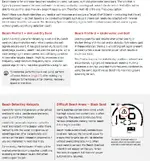
Beach 2 is for when the coil is submerged in salt water, so shallow water hunting, hunting in the surf, diving, etc. Beach 1 is for dry & wet sand, when coil isn't submerged. See attached from page 13 of the user manual.
 

Attachments

  • NOX 700 & 900 Beach Settings.webp
    NOX 700 & 900 Beach Settings.webp
    161.1 KB · Views: 73
All tones sound the same to me. I can't tell the slightest difference.
Get a wide variety of different targets like a nickel, dime, quarter, pull-tab, foil, metal trash, gold or silver ring, any other gold/silver you might have. Take them out to your backyard, place them on the ground. Separate each target by a few feet, set detector for all tones, then swing over each target several times, focusing on the tone you get. You'll find that you might not get a noticeable difference in tones between a nickel and pull-tab, as they sometimes present in the same conductivity range. But you should hear a tonal difference between a nickel and quarter, or a gold ring and quarter, as they're in different conductivity ranges.

Sometimes the differences can be subtle, so it takes a while to be able to hear slight differences as the differences can sometimes be very subtle. It took me almost 2 full seasons and lots of digging every target with my Sovereign, before I was able to start wrapping my head around all the tones I was hearing. But with experience and digging every target so your brain can start associating the tone you're hearing with the target you dug; you'll start to hear and recognize those subtle differences.

Might want to try starting with 5 tones, that still allows you to hear various target ID zones but won't be as overwhelming as all tones. As you gain more and more experience, you can eventually switch over to try all tones.
 
When you use beach 2, is that on dry sand, wet sand or when the coil is in salt water?
Myself, I use it in all beach hunts regardless off wet/dry/water and because jewelry signals can be just about anything, I dig everything that doesn't have a clear iron signal. Lot's of trash, but a lot of good targets that others miss.
 
Thank you for posting this. I think this helps.

I'll try Depth (dP) for the target tone tomorrow and go from there.

1. If you have a target that gives the wrong target ID for whatever reason, what tone would you get? Would you get the tone associated with the target (an accurate tone) or would the tone returned be the tone associated with the target ID (which would actually be the wrong tone)?

2. I was looking at page 21 about enabling Vibration. The blue section shows how to enable vibration by each tone region. I guess this implies that the yellow section shows how to enable Vibration outside of all tone regions, but how is that possible? At any given time, wouldn't you have to be in one of the tone regions?

3. Suppose you have a target that has 3 different metals in it and there are no other targets nearby. When you swing the detector over that target, what target ID would be returned? Would it be the target ID associated with metal 1, metal 2, metal 3 or even some other target ID?
I don't know what you mean about a target giving the wrong I.D. The machine is just making a guess as to what it "sees" based on conductivity and shape. In 50 tones, the tone I.D. is linked to the visual I.D. number. If you get a mixed metal, or two targets together that just won't separate, the detector will average the two signal into one....somewhere in between what each of the two would read separately. Size and shape of each item will modify that signal too as well as depth of each.
 
OK, what’s your number one rule when it comes to metal detecting…….
For me, DIG EVERYTHING!!
In reality, I probably dig 95%🙄🤣🏴‍☠️
 
You are making it harder than you need to, start off with 5 tones and dig everything that doesnt null, learn your detector first using 5 tones. There is no shortcut or magic settings that bypasses or beats learning detector by experience.
 
I run the 900 and GF has the. Elite. We run 5 tone. On the 900 u have sub menu allows u to up/down volume on tone ranges also tone pitch , so u can run 1 tone per id section. This allows 1 tone per target ID range in that section. So i up the sound on tone sections i prefer or dont hear as easy. Or even change the pitch tone to help also.
 
Here is another problem. I held my detector over my steel sand scoop and the target IDs just kept jumping around all over. They didn't even stay around one number. Just very erratic and all over the place. I tried this in Beach 1 and Beach 2 and got the same result.

Here are the settings I used:

Threshold = 0
Target Tone = 2
Recovery Speed = 4
Iron bias = 0
Sensitivity = 20

I didn't have this problem when I had an Equinox 800, but this is the case with the 900. What is happening and what is causing this?
 
Here is another problem. I held my detector over my steel sand scoop and the target IDs just kept jumping around all over. They didn't even stay around one number. Just very erratic and all over the place. I tried this in Beach 1 and Beach 2 and got the same result.

Here are the settings I used:

Threshold = 0
Target Tone = 2
Recovery Speed = 4
Iron bias = 0
Sensitivity = 20

I didn't have this problem when I had an Equinox 800, but this is the case with the 900. What is happening and what is causing this?
Make sure to ground balance and noise cancel. If u have that issue with multiple targets even after lowering sensitivity. It could be a bad coil or connection. Test at open air. Should be easy to eliminate that issue. U can always reset to factory setting at start over.
 
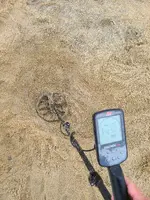
I tried starting in pinpointer mode and got a signal, but no target ID in detect mode. I kept digging and chased the pinpointer signal. After more than a foot, shouldn't I eventually get a target ID in detect mode? What explains this?
 

Attachments

  • 20251012_170056.webp
    20251012_170056.webp
    4.5 MB · Views: 111
What is the target ID for bands of black sand?

Where can I get a chart showing the metals for all target ID's (-19 to 99) for the Equinox 900?
 

Users who are viewing this thread

Back
Top Bottom