What's new

resize,crop, and ADD MORE THAN 1

greydigger

Bronze Member
Joined
Mar 28, 2008
Messages
1,372
Reaction score
35
Golden Thread
0
Location
Aloha, Orygun
Detector(s) used
wishing stick
Primary Interest:
Other
Hello folks, I can resize and crop with Paint but should I save as GIF or JPG?
Also, how do I add more than 1 pic in a post?
Thanks, Grey
 
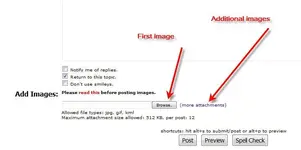
JPG's work pretty well. For additional images-


Attachments

  • images.webp
    images.webp
    17.3 KB · Views: 248
  • more images.webp
    more images.webp
    26.6 KB · Views: 242
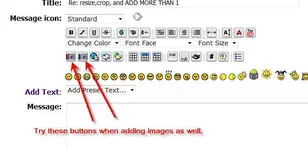
Don't forget to change the # on the camera icon from 1 to however many pics you post.

Example for 1st camera icon:
attach=1

attach=2

attach=3
 
stoney elf said:
Don't forget to change the # on the camera icon from 1 to however many pics you post.

Example for 1st camera icon:
attach=1

attach=2

attach=3

Exactly. And if you use the red camera icon (the one on the left), you will get these "attach" thingys--and you can put them anywhere you like. When you post, if the photos are loaded up in the "Add Images" section, the photos will appear in order at the points where you see "attach = 1" in your text.


IMPORTANT: When I type up a post, I always right-click and select all, then right click again and "copy" so that if it doesn't go through I still have my post saved, and all I have to do is right-click and "paste," then add the images again. :wink:

It can be frustrating to lose something you've already typed.


-Buckles
 
yea. I just messed up and forgot to change #s. LOL
3 of same pic. oops!
 
greydigger said:
yea. I just messed up and forgot to change #s. LOL
3 of same pic. oops!

Just click modify. It'll be fine. But looks like you've got the hang of it. :)
 

Users who are viewing this thread

Back
Top Bottom